> For the complete documentation index, see [llms.txt](https://ajuda.rnp.br/cafe/llms.txt). Markdown versions of documentation pages are available by appending `.md` to page URLs; this page is available as [Markdown](https://ajuda.rnp.br/cafe/sheerid/perguntas-frequentes-sheerid.md).
# Perguntas frequentes - SheerID
Página voltada ao apoio em duvidas sobre a SheerID
#### 1. Sobre a SheerID
{% columns %}
{% column %}
{% endcolumn %}
{% column %}
A SheerID verifica a elegibilidade para ofertas de marcas parceiras. A validação pode liberar descontos ou outros benefícios exclusivos.
{% endcolumn %}
{% endcolumns %}
#### 2. Quais serviços posso obter descontos?
Consulte as ofertas vigentes no [RNP+](https://rnpmais.rnp.br/). Pesquisadores podem acessar diretamente a [página de ofertas para pesquisadores](https://rnpmais.rnp.br/pesquisadores).
Você também pode iniciar uma oferta pelo [portal de ofertas da SheerID](https://www.sheerid.com/shoppers/).
O catálogo e a página de cada oferta informam as condições vigentes. Siga as instruções da oferta escolhida.
{% hint style="info" %}
Cada marca parceira define o público elegível, os requisitos, a duração, o preço ou desconto e os termos. Estudantes, professores, pesquisadores e outros perfis podem ou não se qualificar, conforme a oferta.
{% endhint %}
#### 3. Como acessar e validar uma oferta
1. Localize a oferta no RNP+ ou no portal da SheerID. Abra a página da marca.
2. Preencha o formulário ou cadastro solicitado. Selecione sua instituição quando essa opção aparecer.
3. Quando o fluxo solicitar, autentique-se com suas credenciais institucionais pela CAFe/SSO.
4. Aguarde a confirmação da validação. Depois, siga as instruções da marca para ativar ou resgatar o benefício.
A autenticação pela CAFe/SSO confirma seu vínculo acadêmico. Ela normalmente evita o envio de documentos. Algumas ofertas podem solicitar requisitos ou etapas próprias.
#### 4. Preciso de ajuda com uma oferta
Se houver problema com suas credenciais, com a seleção da instituição ou com a autenticação, procure o suporte ou a TI da sua instituição.
Para pendências de validação, ativação ou regras da oferta, consulte as instruções e o canal de suporte exibidos pela marca ou pela SheerID na própria oferta.
#### 5. Perdi meu acesso ao Perplexity Pro. Como obter novamente?
Esta orientação é específica para uma oferta do Perplexity Pro já ativada.
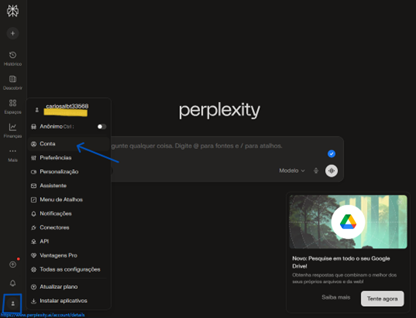
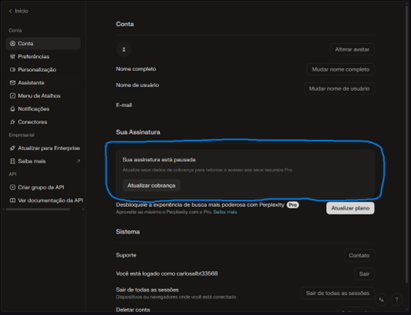
Verifique o status da sua conta. Clique no ícone redondo no canto inferior esquerdo. Depois, clique em **Conta**.
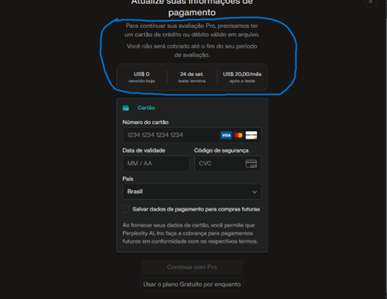
Se o status for “assinatura pausada”, clique em **“atualizar cobrança”**. Adicione um cartão de crédito ou débito válido para reativar a assinatura Pro.
{% columns %}
{% column %}
{% endcolumn %}
{% column %}
{% endcolumn %}
{% endcolumns %}
Verifique a data de validade da assinatura. Ela aparecerá após clicar em “atualizar cobrança”.
Após verificar a data de término do teste, adicione o cartão. Depois, clique em “Continue como Pro”.
{% hint style="warning" %}
Nada deverá ser descontado até o fim do seu período de teste, conforme indica a mensagem acima.
{% endhint %}
Após concluir esses passos, sua assinatura voltará a funcionar na versão Pro.
---
# Agent Instructions
This documentation is published with GitBook. GitBook is the documentation platform designed so that both humans and AI agents can read, navigate, and reason over technical content effectively. Learn more at gitbook.com.
## Querying This Documentation
If you need additional information that is not directly available in this page, you can query the documentation by asking a question.
Perform an HTTP GET request on the following URL with the `ask` and `goal` query parameters:
```
GET https://ajuda.rnp.br/cafe/sheerid/perguntas-frequentes-sheerid.md?ask=&goal=
```
`ask` is the immediate question: it should be specific, self-contained, and written in natural language.
`goal` is what the user is ultimately trying to achieve, the reason they need the answer. Sharing it helps GitBook give you a better, more relevant answer. A goal is most helpful when it describes the outcome the user wants rather than restating the question. For example, with `ask=how do I create an API token`, a goal like `automate deployments from our CI pipeline` lets GitBook tailor the answer to that use case.
The response will contain a direct answer to the question and relevant excerpts and sources from the documentation.
Use this mechanism when the answer is not explicitly present in the current page, you need clarification or additional context, or you want to retrieve related documentation sections.